While in the process of locking up a Mig-21 in an F/A-18, one of our pilots asked how I was getting on with the C-130J, as I am the only pilot in our squadron to own the module. Being busy and in a bit of a difficulty to give a short reply like “great” or “hard to master”, I gave a bit of a non-committal reply, but made a note to expand on the subject later.
I haven’t flown it a lot since Father Christmas added it to my hangar, but have taken the time to go through the manual and watch some other team’s videos in order to get some quick start tips, as most of the time I only fly on-line with the boys and we are generally straight into the action.
The C-130J cockpit is very unlike a fighter and very much like a commercial aircraft. Having worked for an airline and spent several hours on cockpit jump seats the overall layout was immediately familiar, with the autopilot ref/mode buttons on the edge of the instrument panel glare-shield and the pilot’s CNI-MU, (Communications/Navigation/Identification-Management Unit) located on the lower centre console, plus things like the tiller to steer the aircraft on the ground.
Front Panel Layout
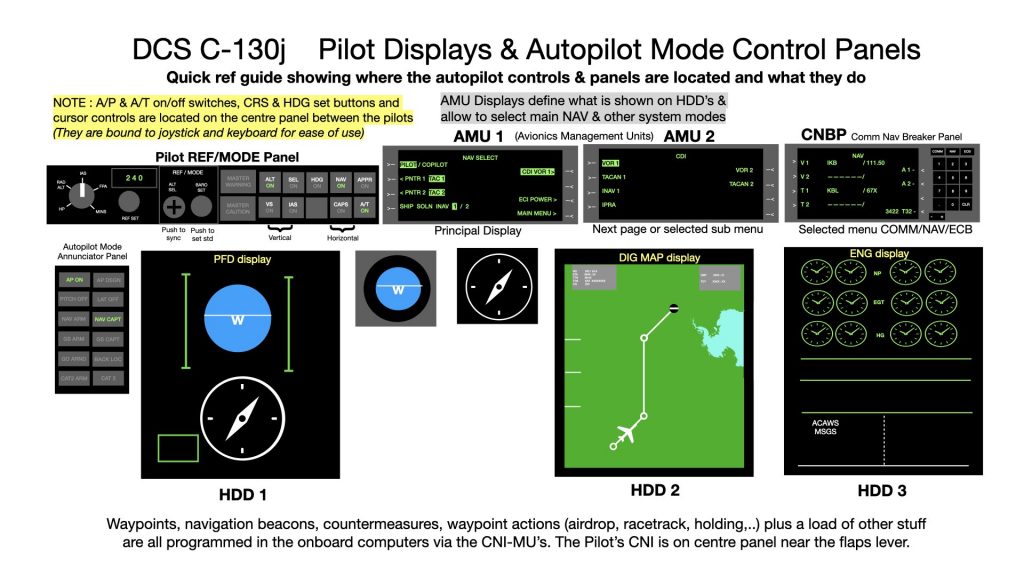
We use the CNI-MU a lot, so if you are using trackIR, like me, it really helps to use the F9 button to lock the view on it’s screen and keyboard and to bind a zoom in key. Everything you need to do from setting up waypoints, to programming an ILS approach, to setting up radio frequencies, to programming an air drop, setting up a holding pattern or dropping a mighty MOAB bomb are all programmed into the CNI-MU and it means spending extended time looking down into the cockpit, so you if you need to be fiddling around with it in flight you’d better be on autopilot.
For example to set up an air drop, having first set up your waypoints to get there, using at least 2 CNI-MU screens, you then have 5 screens of data to fill in to program all the required parameters for the drop, some of which you need to get from elsewhere, such as the cargo load distribution which you can pull up and access using the integrated kneeboard. So while it is nice to be able to follow procedures by the book, it will take you some time to set things up correctly even as you become familiar with them.
My advice is to set up nav waypoints and especially air drops while on the ground and get going. Other stuff like setting up a holding pattern or an ILS approach can be done on the fly if you are not too close to destination.
I find getting the aircraft to engage the flight plan after take-off a bit tricky and I rarely match up with the planned top of climb points indicated by the instruments. I guess I need more practice.
When running in to an air drop zone things get pretty hectic as you close in, with many parameters to watch for and the pilot needs to click on a succession of commands in a very short time. It is essential to bind these to keys as you’ll have no time to search around for the appropriate clickable buttons and switches.
Taxying needs some mastering, as even dampened the tiller is quite sensitive, as is the throttle quadrant around the Ground Idle position, where it is extremely easy to put the props into reverse pitch. I don’t have a hard detent on the old TM Hotas that I use. It is fun to reverse the aircraft, but you need to be very light on the throttles and braking to not lift the nose wheel.
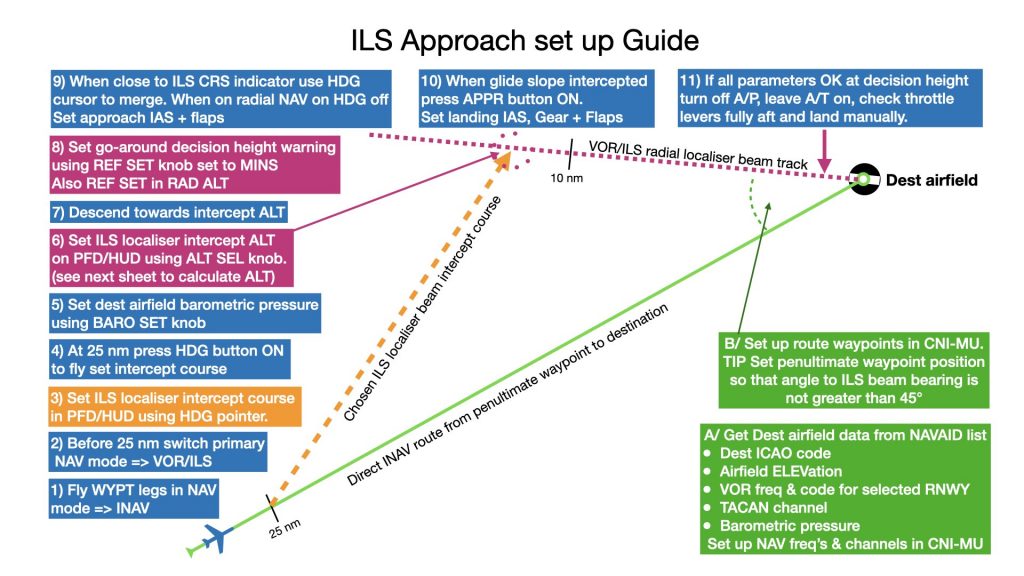
Finally it is very satisfying to set up an ILS approach and to let the aircraft fly down by itself to decision height, where it is time to cut the auto-throttle and to flare manually. With more confidence and experience, I trust that I will soon be able to do this at night or in low visibility.
So yes setting up the flight parameters is rather fastidious and I can understand that some pilots may want to jump over all the procedural stuff and fly, air drop etc by hand and rule of thumb, but as I have said above it is rewarding to follow somewhat what the real aircrews do on mission planning and setting the aircraft up in order to get the goods delivered spot on target.
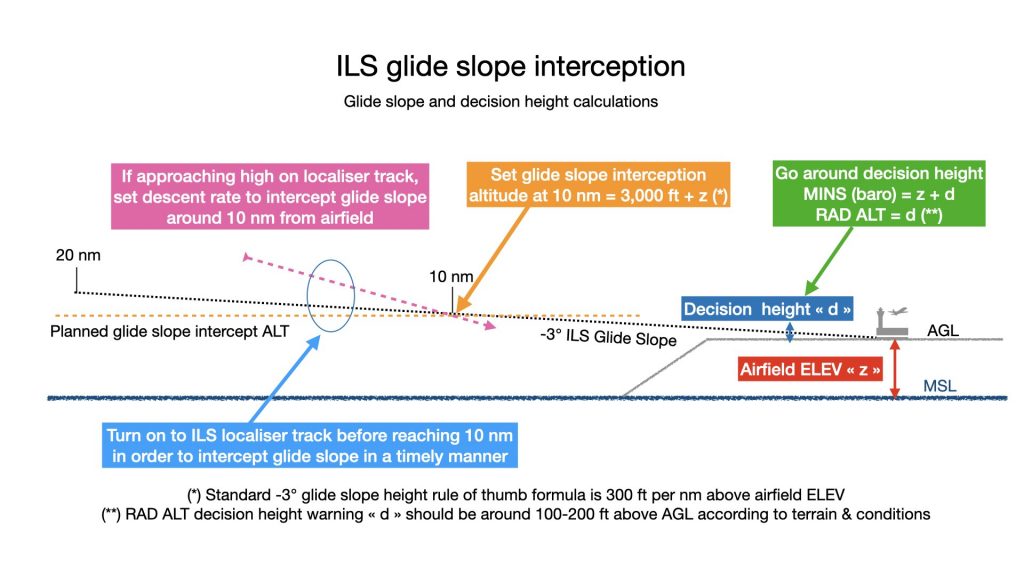
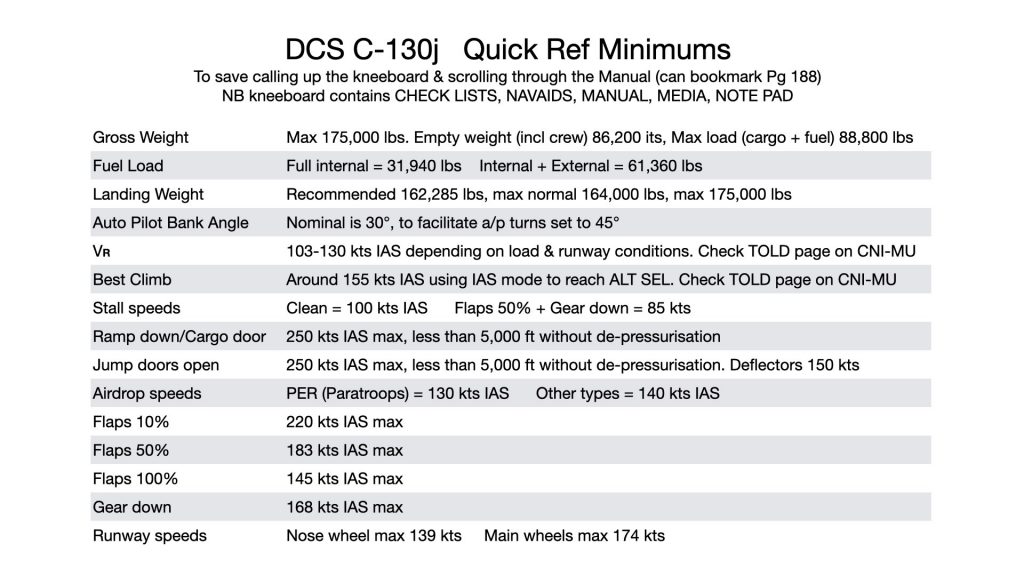
Below some quick ref guides to help set up ILS approach, glide-slope intercept & landing configuration.